Send email from your own address, with your signature
Connect your own mailbox so the documents and invoices you email from CaseMgmt come from you, with your signature underneath.
Last updated October 22, 2026
Who can do this: Admin, Nurse Case Manager, Internal Case Manager, Billing Staff
Steps
- Click your name in the top-right corner and choose My Settings.
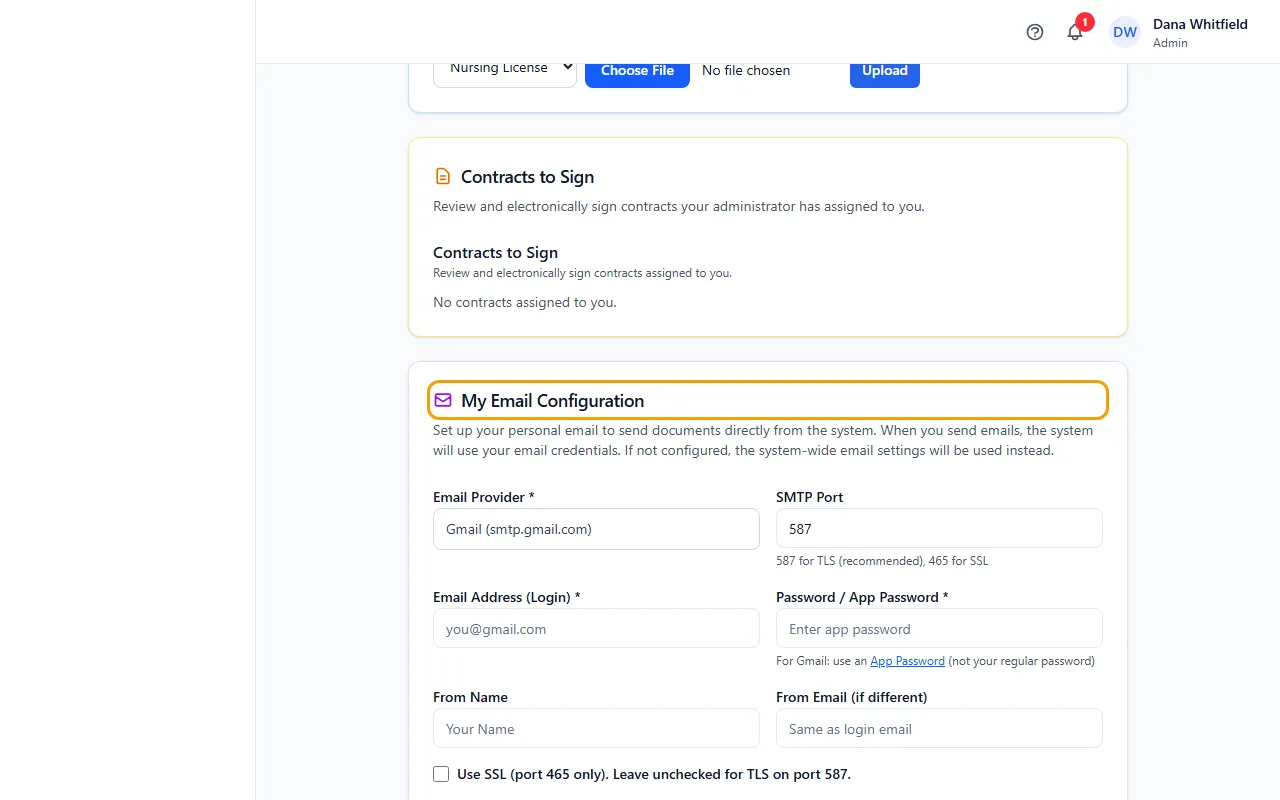
- In My Email Configuration, choose your Email Provider: Gmail, Outlook / Office 365 or Yahoo. Keep SMTP Port at 587 unless your provider says otherwise.
- Enter your Email Address (Login) and Password / App Password. Use an app password, not your normal password.
- If you like, add a From Name and a From Email (if different).
- Click Save Email Settings, then Send Test Email. The test goes to your From Email, or to your login email if that's empty.
- To add a signature, paste it into Signature Content in the Email Signature card (or click Upload HTML File), check the preview, and click Save Signature.
Getting an app password
Gmail: go to Google App Passwords (myaccount.google.com/apppasswords), generate a password, and copy the 16-character password into Password / App Password.
Outlook / Office 365 with two-step sign-in: create one on the Microsoft Security page (mysignins.microsoft.com/security-info).
Your signature
It's added under the message of emails you send from CaseMgmt. Type plain text, paste your Outlook signature, or upload a .html, .htm or .txt file.
Clear empties the box. Click Save Signature afterwards to remove your saved signature.
If something goes wrong
- “Nothing was sent: no email is set up. Set up your email in My Settings, or ask an Admin to set up the company email in Administration > Settings > Email.”
- Fill in My Email Configuration, click Save Email Settings, and send again. Or ask an Admin to set up the company email: it's used when your own isn't set up.
- “Email authentication failed. Check your email/password in Settings. For Gmail, you must use an App Password (not your regular password).”
- Create a new app password, enter it, and save. For Outlook / Office 365, SMTP Auth must be enabled for your mailbox; ask whoever manages your company's Microsoft 365.
- “Could not connect to email server. Check SMTP settings.”
- Check Email Provider and SMTP Port. For port 465 tick the SSL box; for port 587 leave it unticked.