Keep a patient's important notes up to date
Use Important Client Notes for what everyone must know at a glance, and the Notes tab for the intake story.
Last updated October 22, 2026
Who can do this: Admin, Nurse Case Manager, Internal Case Manager
The Notes tab shows unless your company has hidden it. Ask support at admin@casemgmt.io.
Steps
- Open the patient. Important Client Notes is the amber card on Overview.
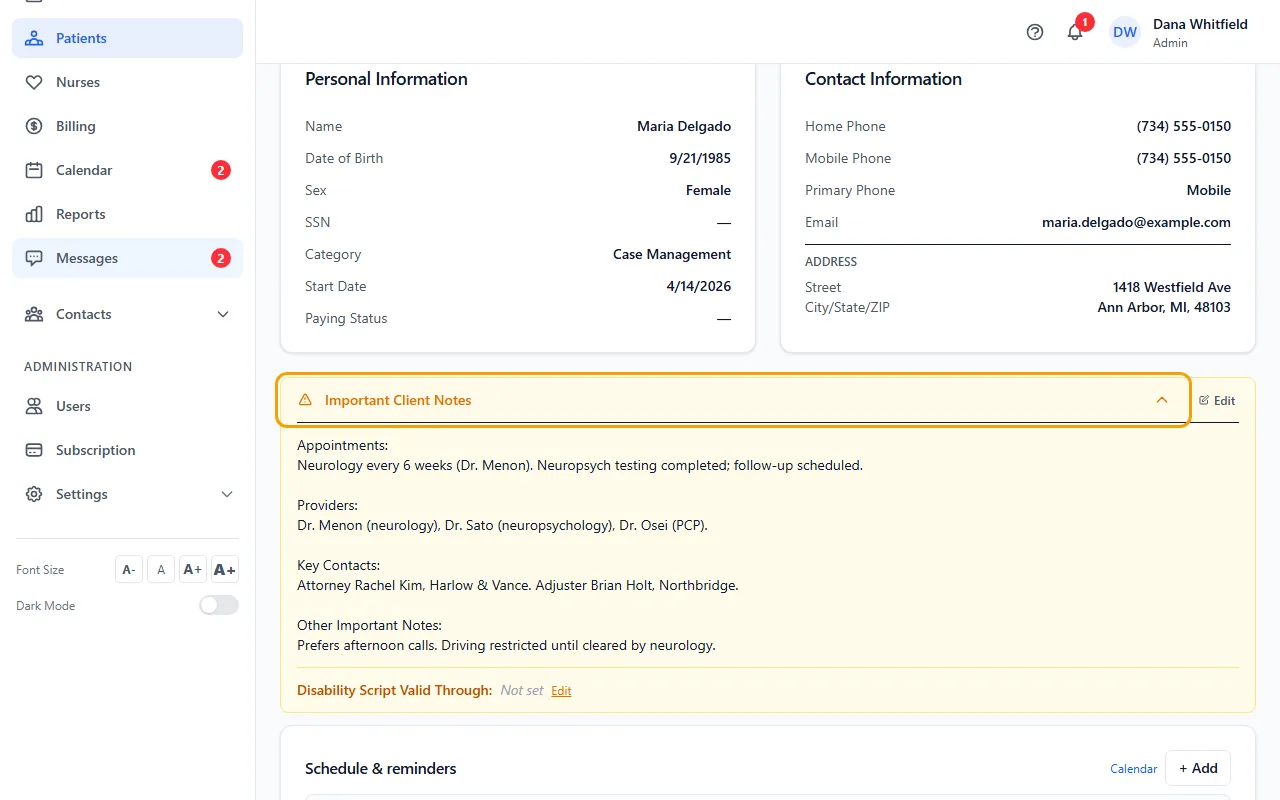
- Click Edit on the card, type your changes and click Save.
- To record how long a disability script is good for, click Edit next to Disability Script Valid Through (inside the same card), type a date such as 12/2026 and click Save.
- For the intake story, open the Notes tab, click Edit Notes, update Intake Notes / Main Concern and click Save.
Where these notes show
Important Client Notes shows on Overview and, shortened, at the top of every other tab, with its own Edit link. A new patient's notes start with the headings Appointments, Providers, Key Contacts and Other Important Notes.
Intake Notes / Main Concern shows only on the Notes tab (and in Edit Profile).
Tips
- Your company can give the Important Client Notes card a different name. Support sets it for you.
If something goes wrong
- “Failed to save: Forbidden”.
- Your login can't edit patients. Ask your Admin.