Check a nurse's cases and hours
The Nurses page shows each nurse's open cases and time entries, and lets you approve time.
Last updated October 22, 2026
Who can do this: Admin, Nurse Case Manager, Internal Case Manager
Before you start
- Admins see every nurse. Everyone else sees only their own row, opened for them.
Steps
- Click Nurses in the menu. The cards at the top show Active Nurses, Nurse Managers, Total Assigned Cases and Avg Cases per Nurse.
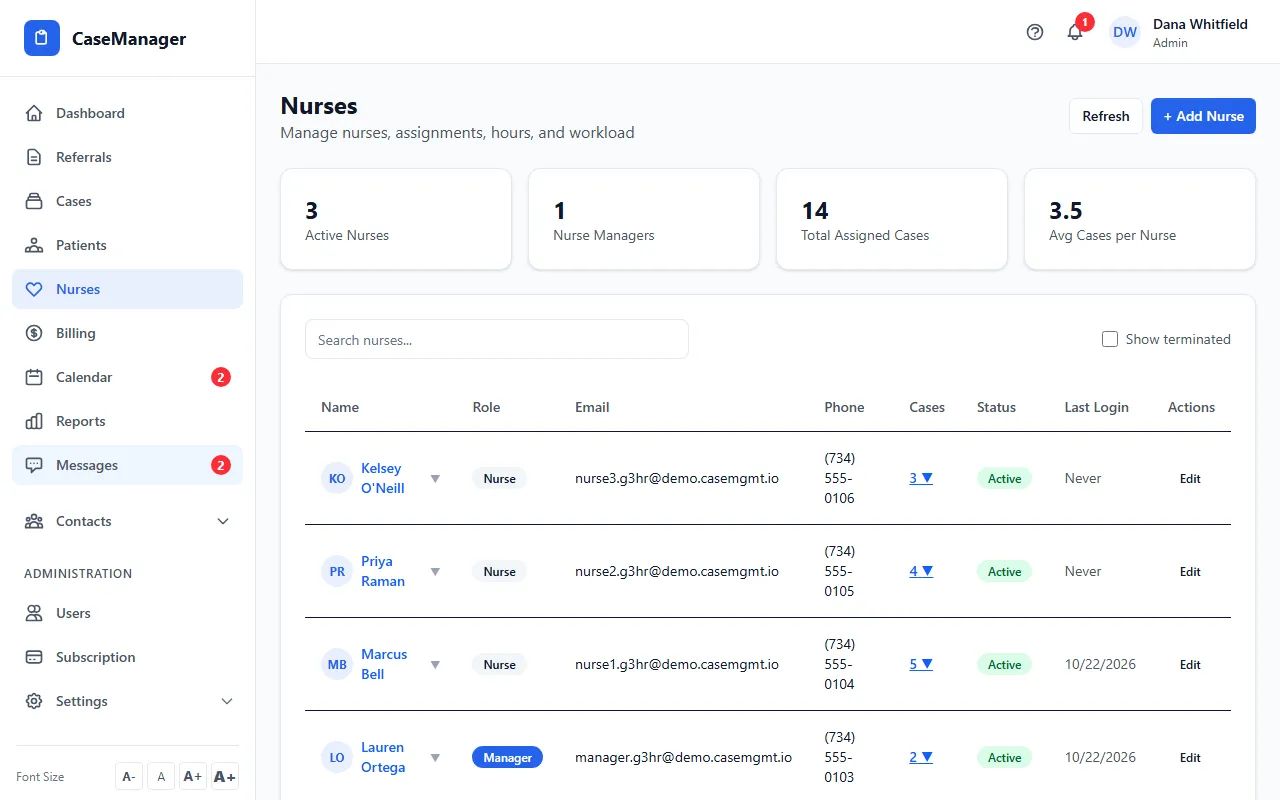
- Find the nurse with Search nurses... if the list is long. Tick Show terminated to include people who have left.
- Click the nurse's name (or the number in Cases) to open their details: active cases, total, approved and pending hours, travel hours and total billable.
- On Patients & Cases, click a patient's name or View Patient to open the patient file.
- On Time Entries & Hours, click Approve or Reject on time that's waiting, or Edit to fix the hours, description or rate, then Save.
What the list shows
Each row has the name, Role (Manager or Nurse), email, phone, number of cases, Status and Last Login (Never if they haven't signed in). People who are Terminated or Suspended are greyed out.
Only users with the Nurse Case Manager or Internal Case Manager role are listed here. Other users are on the users page.