Assign a nurse to a patient
Add or remove the nurses working a patient, right from the top of the patient file.
Last updated October 22, 2026
Who can do this: Admin, Nurse Case Manager
Steps
- Open the patient. The assigned nurses show as blue name tags next to the status (or No nurse assigned).
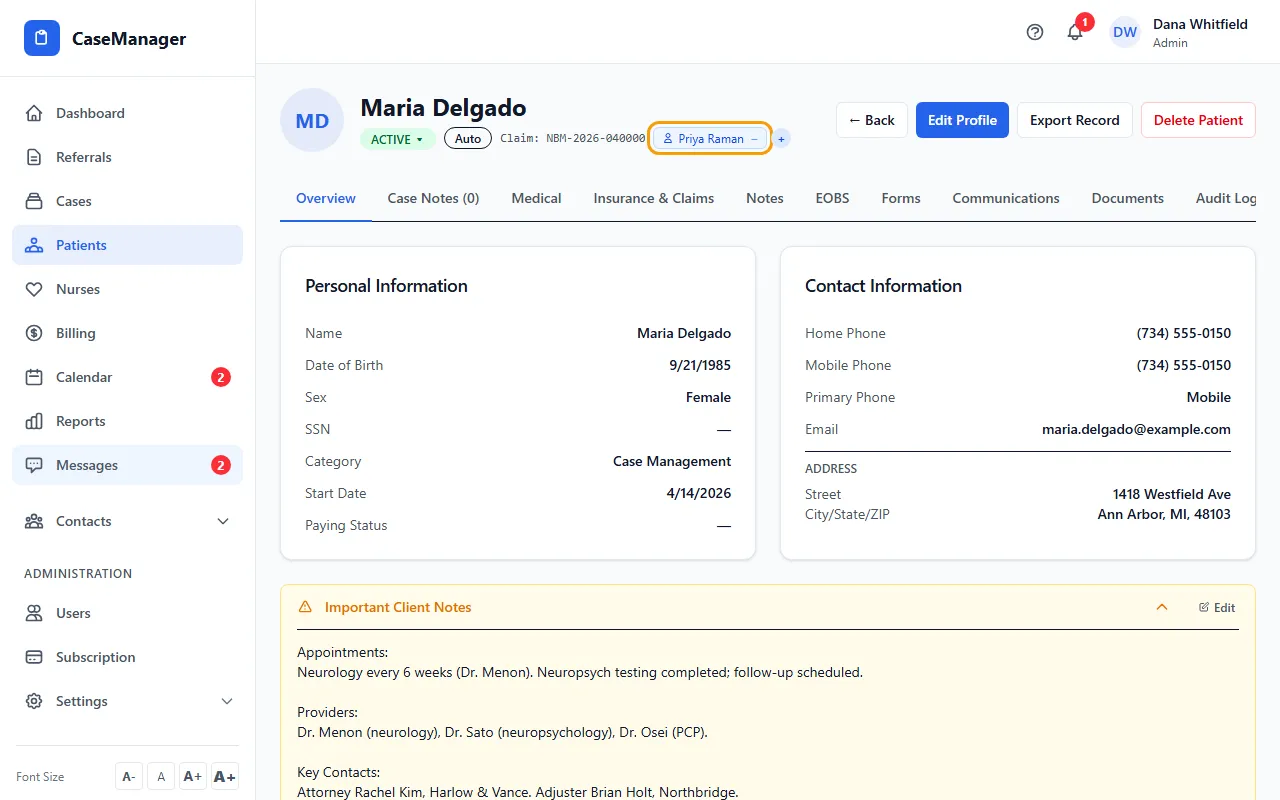
- Click the round + after the names. A list titled Add Nurse / Case Manager opens.
- Click the nurse to add. Their name tag appears straight away.
- To take a nurse off, click the minus sign (−) on their name tag and confirm.
How it works
Nurses are assigned to the patient's case. The list shows active users with the Nurse Case Manager or Internal Case Manager role who aren't assigned yet.
If the patient has no open case, adding a nurse creates one first (using the patient's category as the case type).
If the patient has more than one open case, + adds the nurse to one of them. To choose the case, open it from Cases and use + there.
The Assigned Nurse column on the Patients list shows the first assigned nurse.
If something goes wrong
- There's no + or minus sign.
- Only Admins and Nurse Case Managers can change assignments.
- “No more nurses available”.
- Every active nurse is already assigned. Add the person as a user first; see Add a nurse.