Give an attorney or adjuster portal access
Create a free Referral Staff login so a referral partner can send and track referrals online.
Last updated October 23, 2026
Who can do this: Admin
Before you start
- Make sure their firm or company is in your list of organizations. Law firms are added under Contacts > Law Firms.
- Referral Staff logins are free: they never add a seat charge and don't use up the users included in your plan.
Steps
- Open Administration > Users and click Add User.
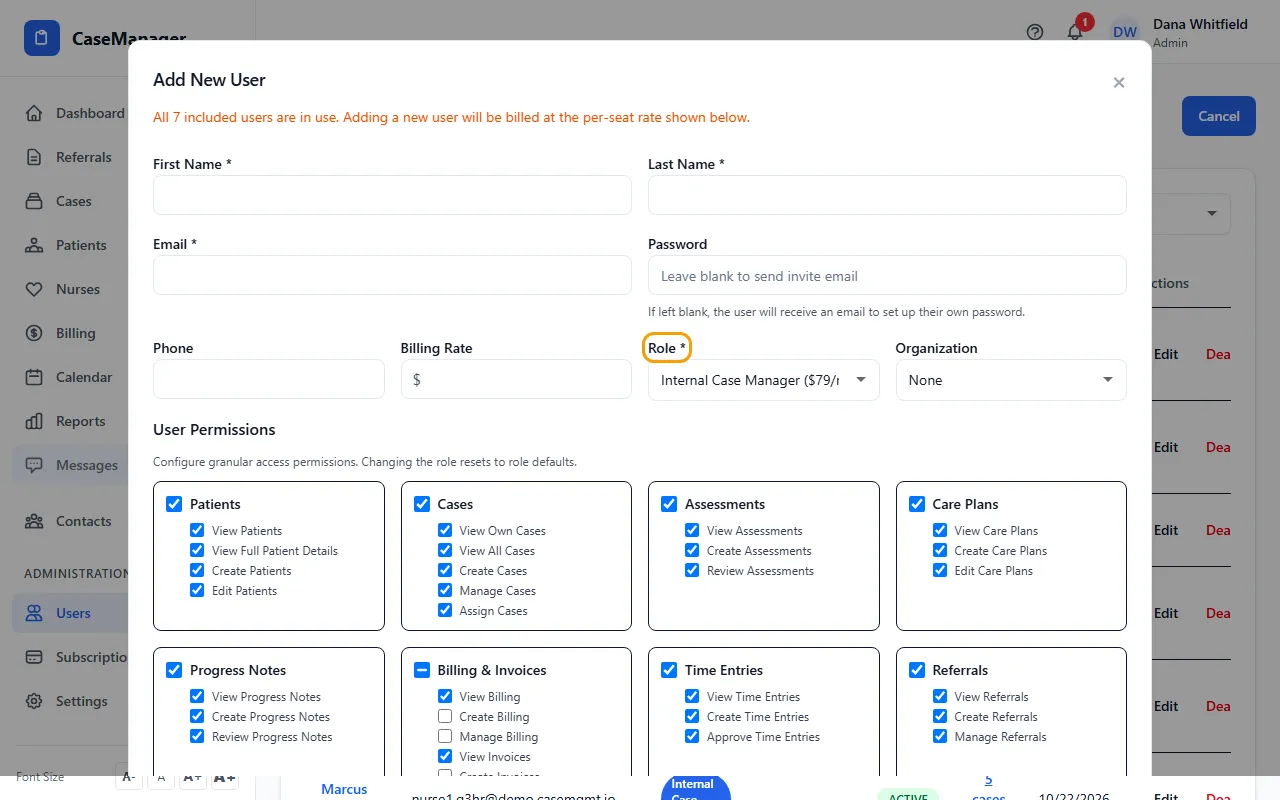
- Enter their First Name, Last Name and Email.
- Leave Password blank to email them a link to set their own password (the link works for 7 days), or type one to give them yourself.
- Set Role to Referral Staff.
- In Organization, choose their firm or company. Their referrals are credited to it, and they can't submit until it's set.
- Click Create User. If a cost summary appears, click Confirm & Add User.
- Send them to casemgmt.io/portal/login. Point them to Sign in to the referral portal.
What a referral partner can do
Submit new referrals, see the referrals they submitted with their status, and download each one as a PDF.
They see only the referrals they submitted themselves through the portal. Referrals your staff typed in for them, or that a colleague sent, don't appear.
They don't get your staff screens (no patient files, case notes or contacts), and they can't change a referral after sending it.
Turning access off
Edit the user, set Account Active to No and click Save Changes. They can no longer sign in, and their referrals stay on your list.
If something goes wrong
- “Email already in use”
- That email address already has a CaseMgmt login (capital letters don't make a different address). Use a different address, or contact support.
- The partner sees “Your account is not associated with an organization. Please contact your administrator.”
- Edit the user, choose their Organization and click Save Changes.