Sign in to the referral portal
The referral portal is where attorneys, adjusters and other partners send referrals and follow their progress.
Last updated October 22, 2026
Who can do this: Referral Staff
Before you start
- The case management company creates your login. Either they give you a password, or you get an email with a link to set your own; that link works for 7 days.
Steps
- Go to casemgmt.io/portal/login. The page says Referral Source Portal.
- Enter your Email and Password.
- Click Sign In to Portal.
- You land on your Dashboard. Use the tabs at the top to move between Dashboard, My Referrals and New Referral.
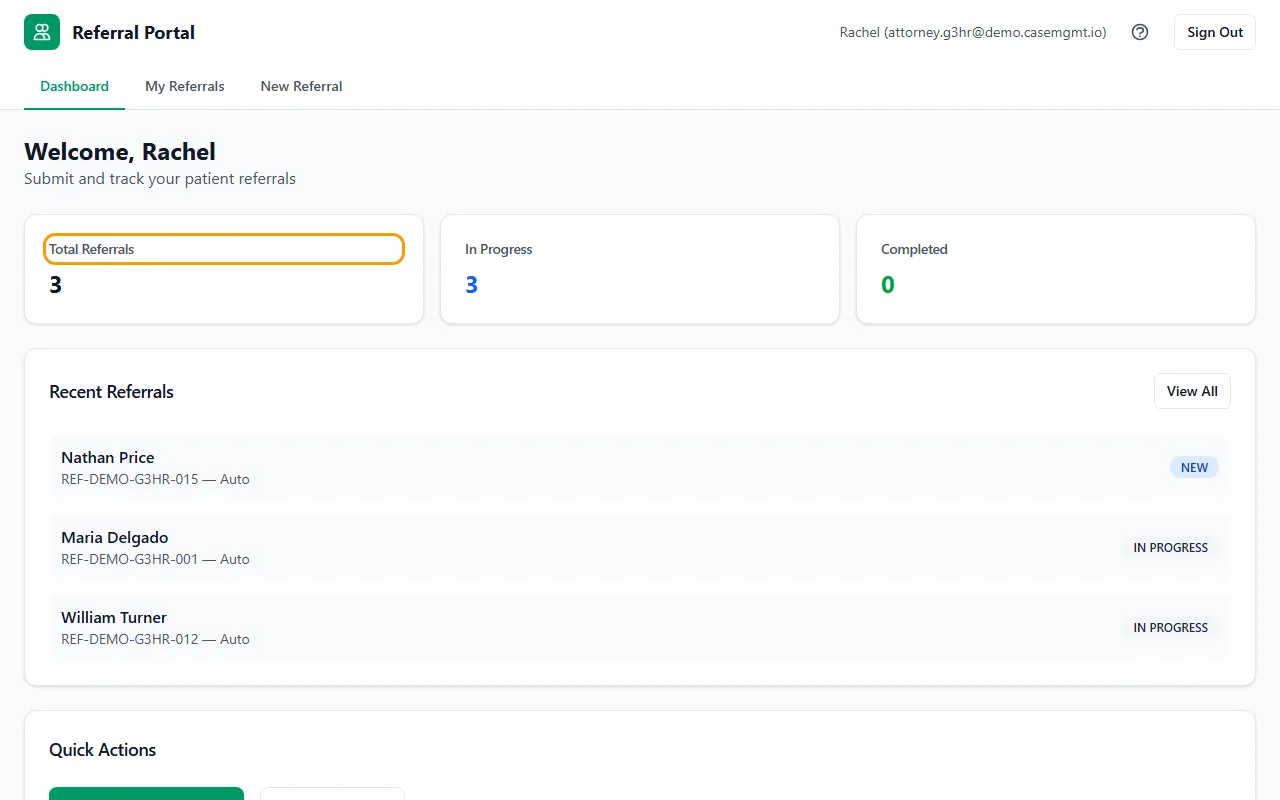
Your dashboard
Total Referrals counts every referral you've sent. In Progress counts the ones still open (New, Accepted, Assigned and In Progress). Completed counts the ones that are Completed or Closed.
Recent Referrals lists your five newest. Click one to open it, or click View All.
Under Quick Actions, click Submit New Referral or View All Referrals.
Signing out
Click Sign Out at the top right. For security you're also signed out after 30 minutes without activity; just sign in again.
If something goes wrong
- “Invalid email or password”
- Check the email address and password. To reset your password, click Staff Login, then Forgot password?. The reset link works for 1 hour.
- I was sent to the regular sign-in page.
- That page works for you too. Sign in there and you'll land in the referral portal.
- I never got the email to set my password.
- Check your spam folder. The link works for 7 days; after that, ask the case management company to send a new one.