Submit a referral through the portal
Send a patient referral to the case management company online, with insurance and legal details.
Last updated October 22, 2026
Who can do this: Referral Staff
Steps
- Click New Referral at the top (or Submit New Referral on your dashboard).
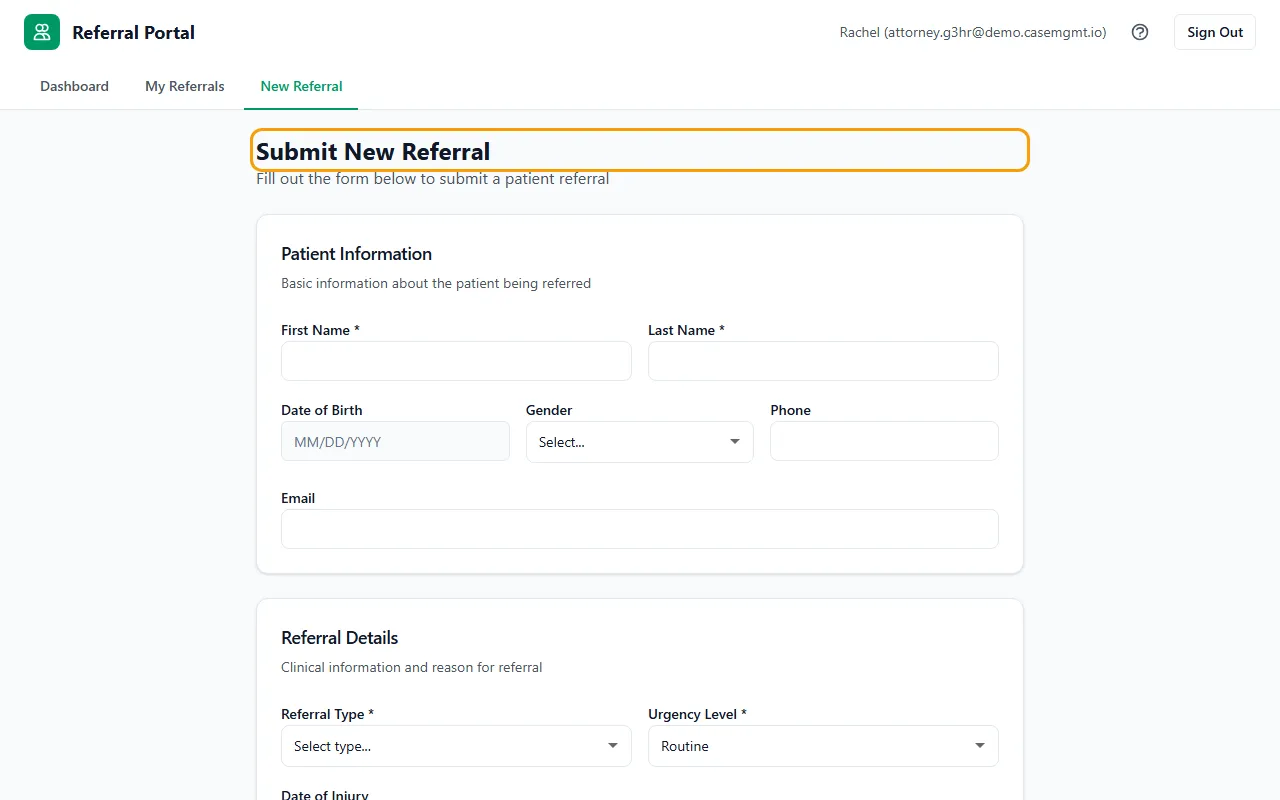
- Under Patient Information, enter the patient's First Name and Last Name (required), and their date of birth, gender, phone and email if you have them.
- Under Referral Details, choose the Referral Type and the Urgency Level: Routine, Urgent or Emergent.
- Add the Date of Injury and the Reason for Referral. Put anything the nurse must not miss in Attention Notes.
- Fill in what applies under Auto Insurance, Legal Representation and Health Insurance. All of these are optional.
- Click Submit Referral. You're taken to My Referrals, where it shows with the status New.
Tips
- You can leave the date of birth blank if you don't have it.
- The insurance company boxes suggest names as you type, but you can type one that isn't listed.
- You can't change a referral after you submit it. To correct something, contact the case management company.
- If a referral can't wait, call the case management company as well.
If something goes wrong
- “Please fill in all required patient fields”
- Enter the patient's first and last name.
- “Please select a referral type”
- Choose an option in Referral Type.
- “Your account is not associated with an organization. Please contact your administrator.”
- Your login isn't linked to your firm yet. Ask the case management company to set it, then submit again.