Export report data to a spreadsheet
Download referrals, cases, time, billing, productivity, AR aging and patient data as CSV files.
Last updated October 22, 2026
Who can do this: Admin, Nurse Case Manager, Internal Case Manager, Billing Staff
Steps
- Open Reports and click Data Exports.
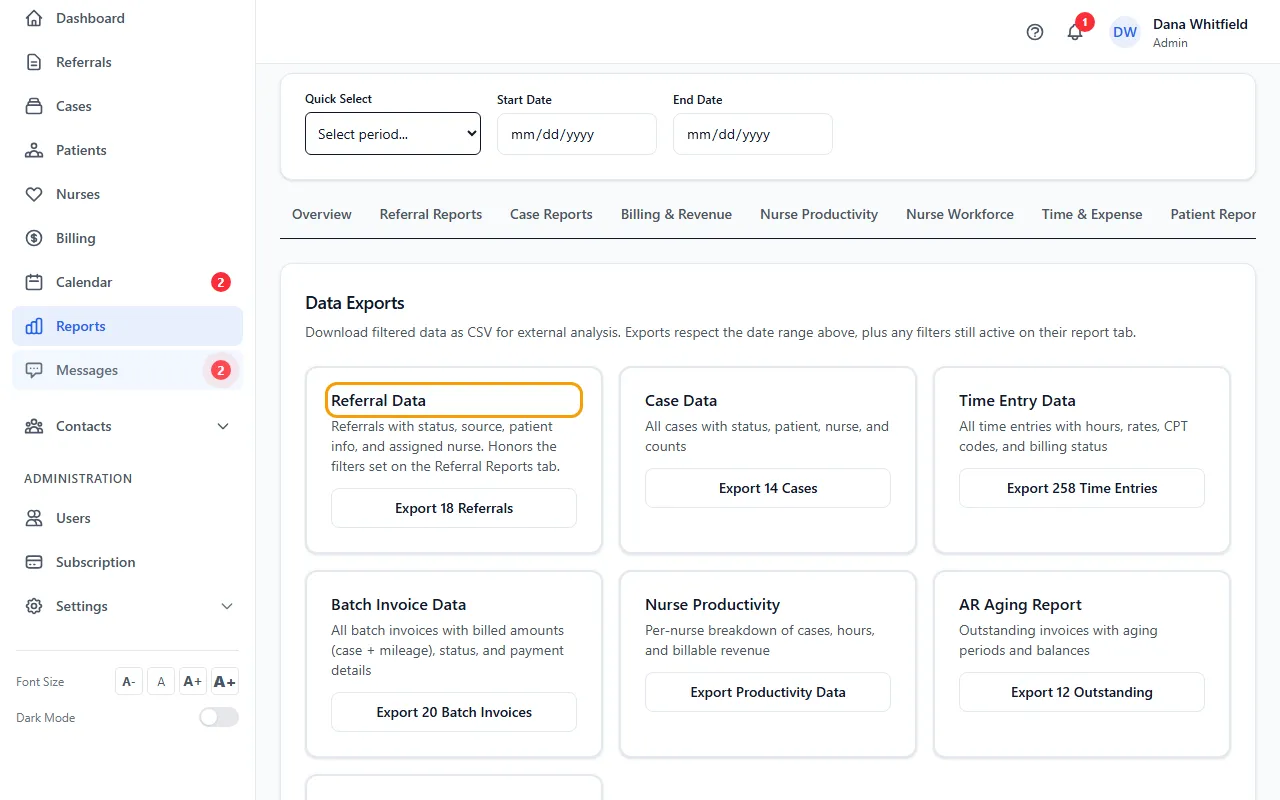
- Set the dates at the top of the page first.
- To export only some referrals, set the filters on Referral Reports first.
- Click the button on the card you want. Each button shows how many rows it will export.
- Open the downloaded CSV file in Excel or another spreadsheet program.
The exports
Referral Data, Case Data, Time Entry Data, Batch Invoice Data, Nurse Productivity, AR Aging Report and Patient Demographics.
Exports follow the dates at the top, plus any filters still set on their report tab. Patient Demographics always includes all patients.
Money figures are read from batch invoices, which only people with the Manage Billing permission can see (Admins and Billing Staff by default). For everyone else they show $0.