Filter reports by date
Pick a period once at the top of Reports; most report tabs, their charts and their exports follow it.
Last updated October 22, 2026
Who can do this: Admin, Nurse Case Manager, Internal Case Manager, Billing Staff
Steps
- Open Reports.
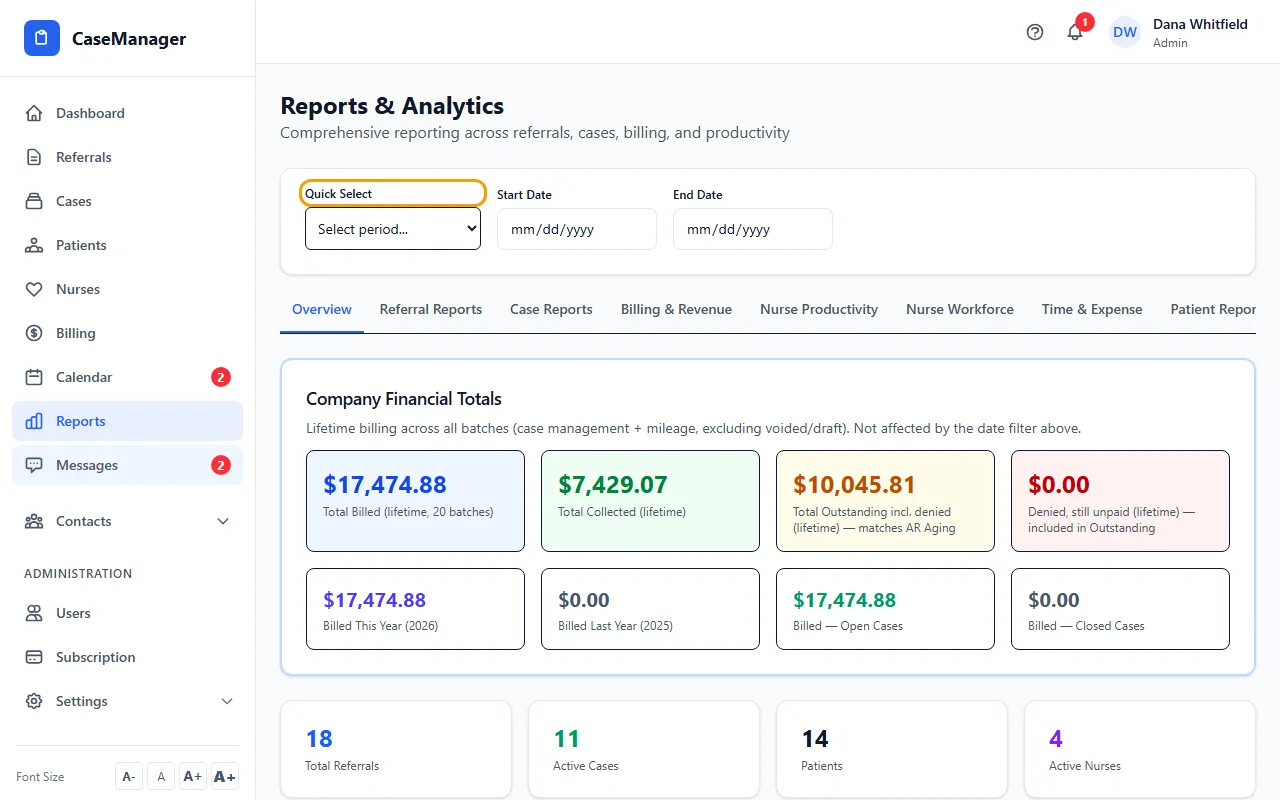
- Choose a period under Quick Select: This Month, Last Month, This Quarter, Last Quarter, This Year, Last Year, Last 30 Days or Last 90 Days.
- Or type your own Start Date and End Date.
- To clear the dates, choose All Time under Quick Select.
What the dates filter
Referrals, cases, time entries and batches are matched on the day each record was created in CaseMgmt. For a batch that's the day it was created, not its billing period; for time, the day it was entered, not the date of service.
Each report tab shows its reporting period at the top, and its exports say which dates they cover.
The Activity Log tab uses these same dates: changing them there changes them here.
Not affected by the dates
Company Financial Totals on Overview, Patient Reports and Provider Reports always cover everything.
Nurse Workforce, Time & Expense and Loss / Write-offs have their own date fields.
If something goes wrong
- A report is empty for my period.
- Records are matched on the day they were created. Try a wider range, or All Time.