Read the Reports overview
Company-wide totals, key counts and trend charts, with each card opening the report behind it.
Last updated October 22, 2026
Who can do this: Admin, Nurse Case Manager, Internal Case Manager, Billing Staff
Steps
- Open Reports. The Overview tab opens first.
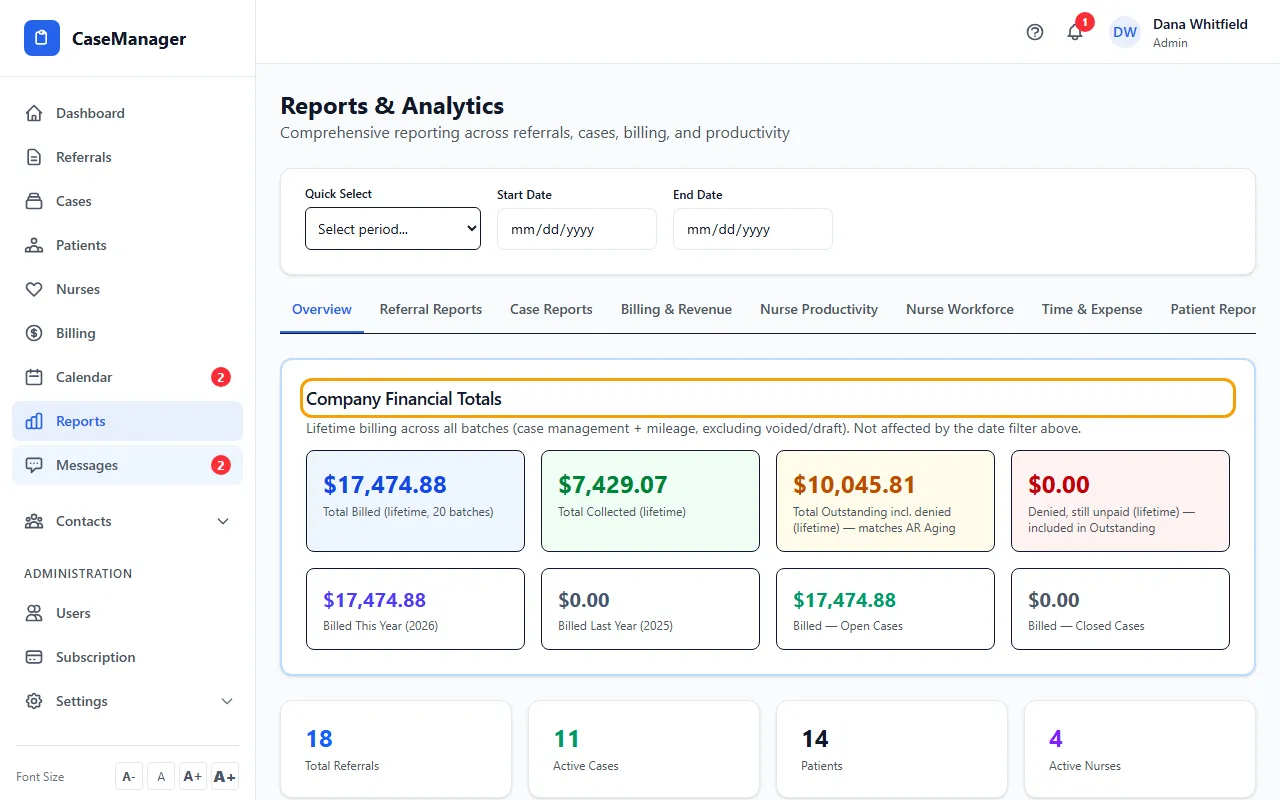
- Read Company Financial Totals: lifetime billed, collected, outstanding (including denied) and denied, plus billed this year, last year, and for open and closed cases.
- Check the count cards, such as Total Referrals, Active Cases, Revenue Collected and Overdue Invoices.
- Click any card to open the report behind it.
- Scroll down for Revenue Trend, Case Distribution, Referral Conversion, Collection Rate and Avg Revenue/Case.
What's counted
Company Financial Totals cover all time and ignore the date filter. Billed amounts include case management and mileage, and leave out draft and voided batches.
Everything else on the tab follows the dates at the top.
Money figures are read from batch invoices, which only people with the Manage Billing permission can see (Admins and Billing Staff by default). For everyone else they show $0.