Run the Loss / Write-offs report
See the work that can never be billed, valued at what it would have billed for, by referral source and patient.
Last updated October 22, 2026
Who can do this: Admin, Nurse Case Manager, Internal Case Manager, Billing Staff
Steps
- Open Reports and click Loss / Write-offs.
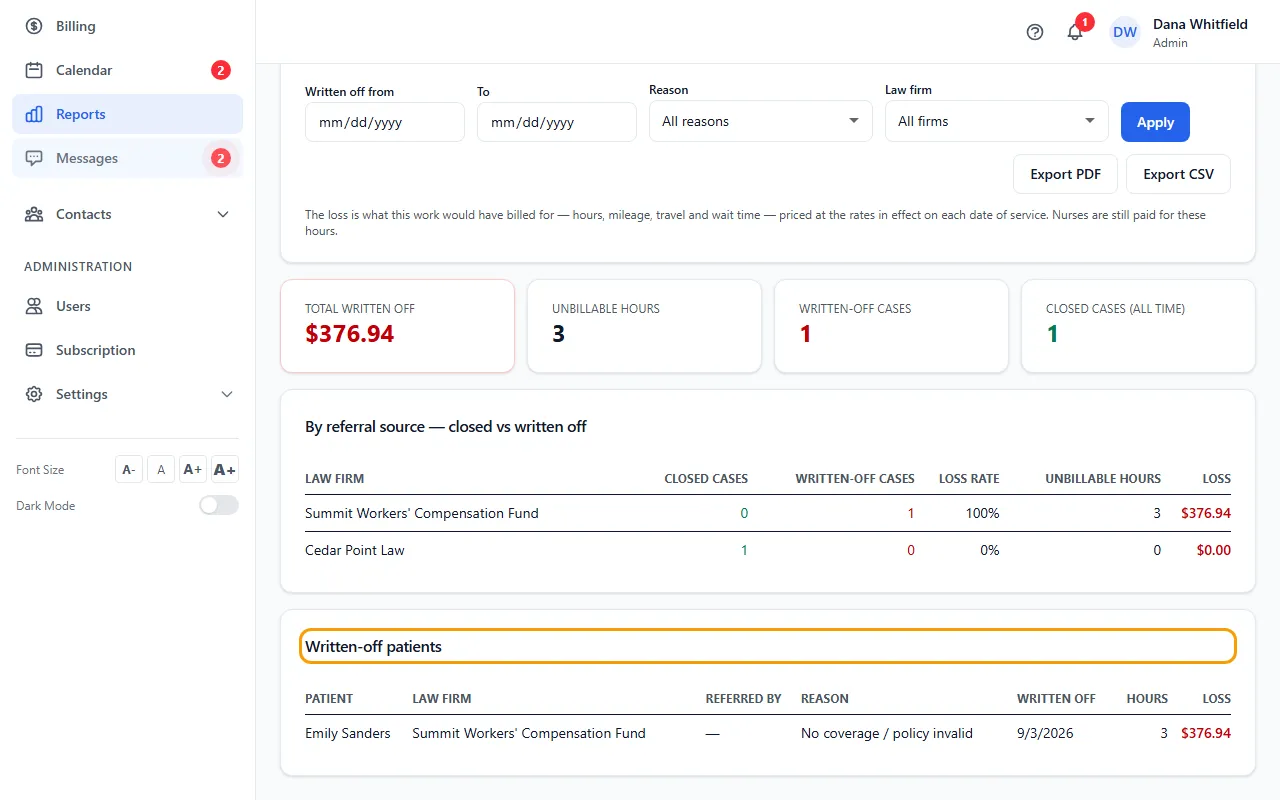
- Set Written off from and To, choose a Reason, and click Apply.
- Choose a Law firm to narrow the lists to one referral source.
- Read the totals: total written off, unbillable hours, written-off cases and closed cases (all time).
- Read By referral source — closed vs written off and Written-off patients.
- Click Export PDF or Export CSV.
What counts as a write-off
A write-off is recorded when a patient is marked with Mark as No Coverage on the Patients page. The reasons are: No coverage / policy invalid, Patient did not continue, Attorney dropped the patient, and Other.
The loss is what the work would have billed for (hours, mileage, and travel and wait time when your company uses them), priced at the rates in effect on each date of service. Nurses are still paid for these hours.
The closed-cases total always covers all time.