Run the Nurse Workforce report
Hours, payroll and money billed per nurse in one report, with a per-patient breakdown and XLSX, PDF and CSV downloads.
Last updated October 23, 2026
Who can do this: Admin
Before you start
- You need the View Financial Reports permission. Admins have it by default.
Steps
- Open Reports and click Nurse Workforce. It loads for all nurses and all dates.
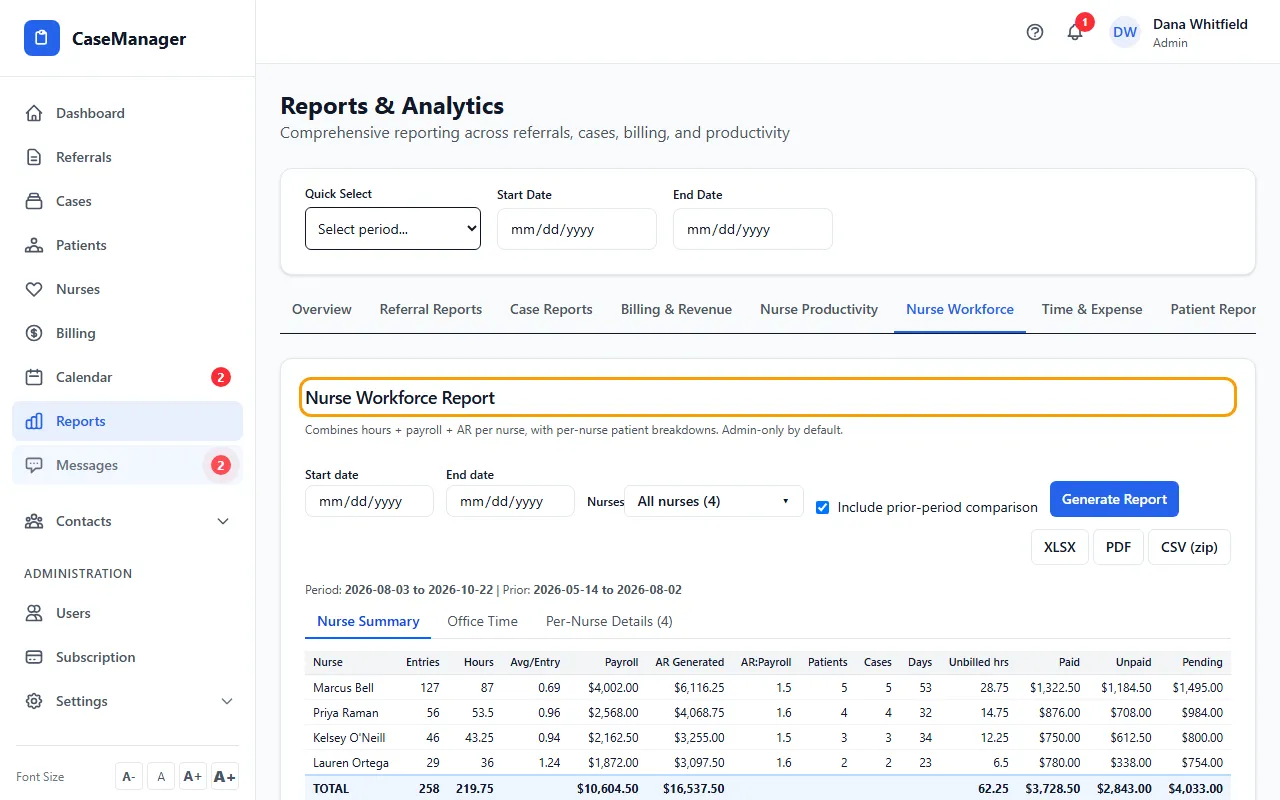
- To narrow it, set Start date and End date, and choose nurses under Nurses.
- Tick Include prior-period comparison to compare with the period just before.
- Click Generate Report.
- Switch between Nurse Summary, Office Time and Per-Nurse Details.
- Download it with XLSX, PDF or CSV (zip).
What's in it
Nurse Summary gives one row per nurse: entries, hours, payroll, AR generated, AR to payroll, patients, cases, days worked, unbilled hours, and paid, unpaid and pending pay.
Office Time lists time logged to a patient record named Office Time. That time is kept out of the nurse summary.
Per-Nurse Details shows each nurse's patients with hours billed, payroll earned and AR balance (what every bill for that patient still owes, batches and single invoices, each once). Use Expand all and Collapse all to open or close them.
If something goes wrong
- “You do not have permission to view this report.”
- Ask your Admin for the View Financial Reports permission.