Manage CPT and HCPCS billing codes
Keep the CPT/HCPCS codes, each with a default rate, that you use on invoices and CMS-1500 claims.
Last updated October 22, 2026
Who can do this: Admin
Steps
- Go to Administration > Settings > CPT/HCPCS Codes.
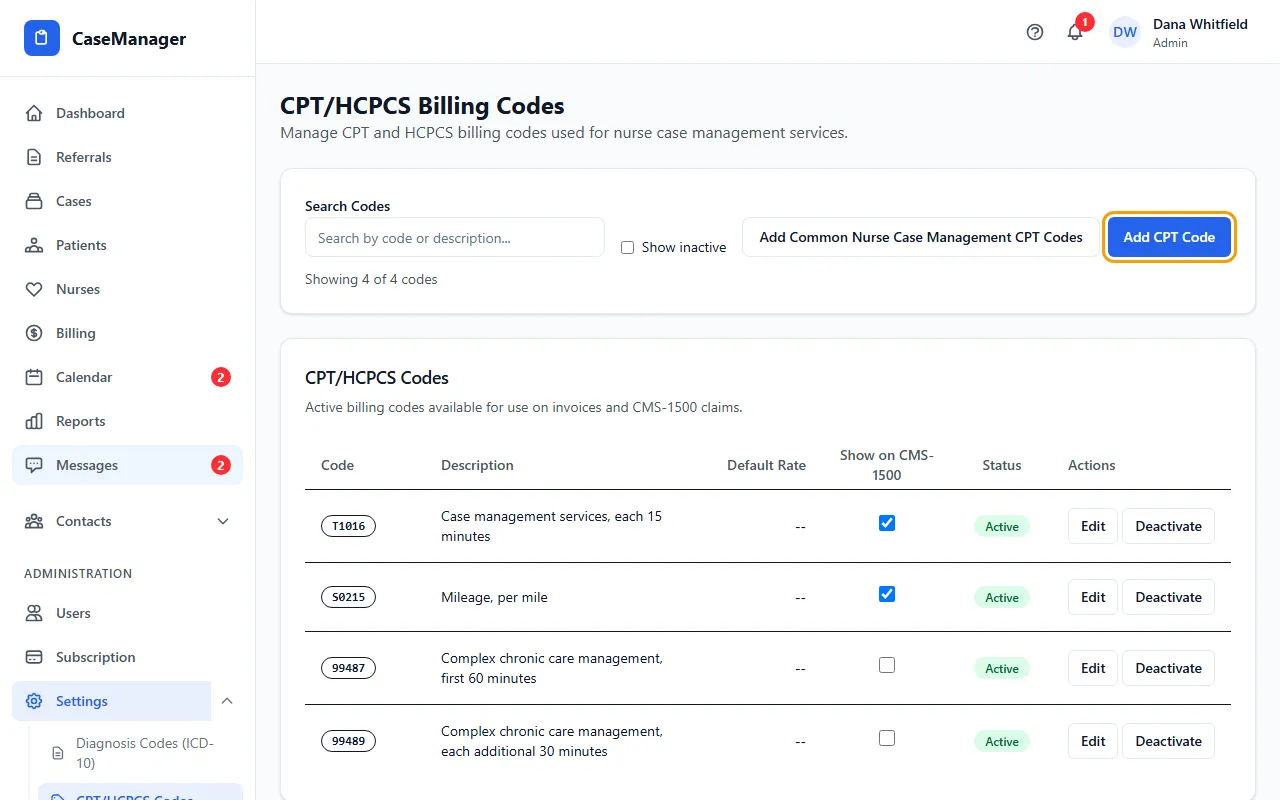
- To start with a ready-made list, click Add Common Nurse Case Management CPT Codes. Codes you already have aren't added twice.
- To add your own, click Add CPT Code, enter the Code (for example T1016), Description and Default Rate ($), and click Save Code.
- To change a code, click Edit, make the change and click Update Code.
- Click Deactivate on codes you don't use. Tick Show inactive to see them again, and click Activate to bring one back.
- Tick Show on CMS-1500 on a code to make it available to add to the CMS-1500 form.
How this fits with Rates & Pricing
This page is your list of codes. Which codes print on your CMS-1500, and how each line is charged, is set in CMS-1500 Service Codes under Administration > Settings > Rates & Pricing. See Set your rates, mileage and payment terms.
If something goes wrong
- “All common codes already exist. No duplicates added.”
- Nothing to do: you already have every code on the ready-made list.