Find a patient on the Patients list
Search, filter and sort your patients, and find patients whose work has ended.
Last updated October 22, 2026
Who can do this: Admin, Nurse Case Manager, Internal Case Manager, Billing Staff
Steps
- Click Patients in the menu. The list shows patients whose work is still going on.
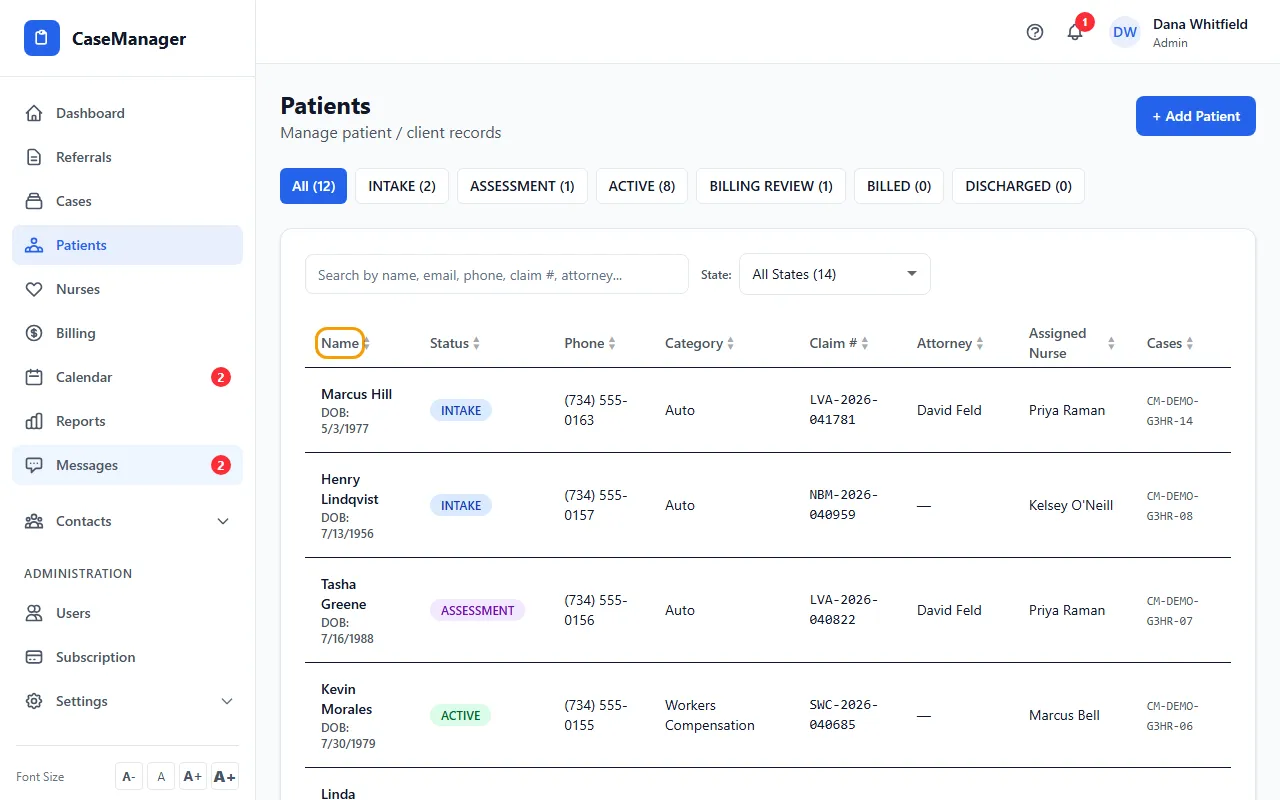
- Type in the search box to find a patient by name, email, phone, claim number or attorney.
- Use the status buttons above the list (All, INTAKE, ASSESSMENT, ACTIVE and so on) to show one status only. Each shows how many patients it has.
- Use State: to show one state. Your choice is remembered in this browser the next time you open the list.
- Click a column heading to sort by it. Click again to reverse the order, and a third time to go back to the normal order.
- Click a row to open that patient's file.
What each row shows
Name (with nickname and date of birth), Status, Phone (the one marked as primary), Category, Claim #, Attorney, Assigned Nurse and Cases. Some columns are hidden on small screens.
A patient with two or more open cases appears once for each case, with that case's number in the Cases column.
Patients whose work has ended
Patients with the status CLOSED, BILLED, DISCHARGED or NO COVERAGE move to Closed / Ended Patients at the bottom of the page. Click it to open the list. Search and the state filter work there too.
Coming from Practice Summary
Clicking a number such as In Litigation or Awaiting Insurance on the Practice Summary card in Billing opens this list showing only those patients. A blue bar says what you're looking at; click Clear filter to see everyone again.
If you only see names
Some logins are set up to see documents only (an Admin turned off View Full Patient Details for them). They see a plain list of names; clicking one opens that patient's Documents and Billing tabs only.
Tips
- Admins and Nurse Case Managers can change a patient's status right from the list by clicking the status badge. See Change a patient's status.
- Internal Case Managers see every patient by default. If an Admin turns off View All Cases for one of them, that person only sees patients on cases they are assigned to.
If something goes wrong
- A patient is missing from the list.
- Check the status buttons and the State: filter (choose All States), then open Closed / Ended Patients at the bottom.