Referral statuses and how to change them
What New, Accepted, Assigned, In Progress, Completed and Closed mean, and which ones change by themselves.
Last updated October 22, 2026
Who can do this: Admin, Nurse Case Manager, Internal Case Manager
Before you start
- You need the Manage Referrals permission (Admins, Nurse Case Managers and Internal Case Managers have it by default).
Steps
- Open Referrals and click the status badge on the referral's row.
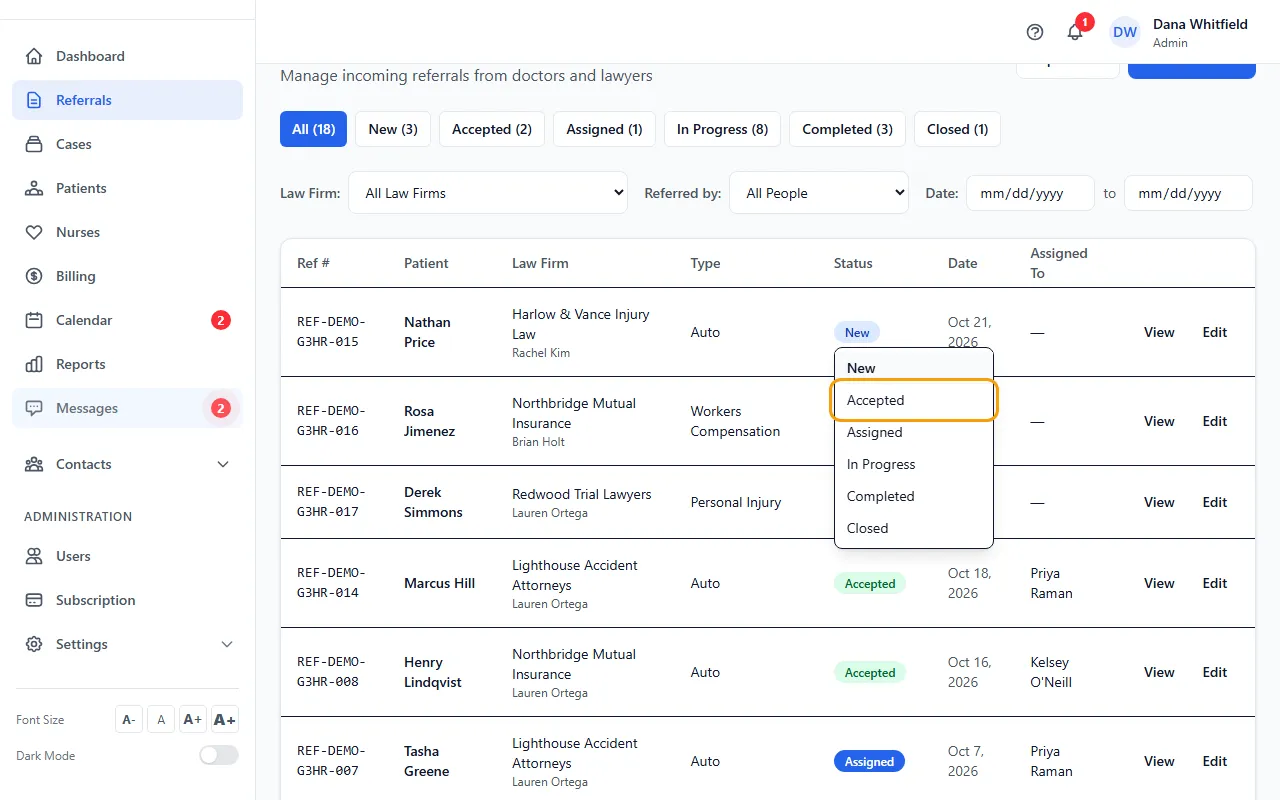
- Pick the new status from the list. The badge changes right away.
- The change is recorded under Notes on the referral page, with who made it and when.
What each status means
New: just arrived and not reviewed yet.
Accepted: your team accepted it (Accept Referral on the referral page).
Assigned: the case has been created from it.
In Progress: the work is under way.
Completed: the work is finished.
Closed: closed without going further, for example when the patient chose another provider.
Changes CaseMgmt makes for you
Creating the case from a referral sets it to Assigned.
When that case or patient is set to Closed, Discharged or Billed, an open referral (New, Accepted, Assigned or In Progress) becomes Completed.
If the case is opened again, a Completed referral goes back to In Progress.
A Closed referral is never changed automatically.
Who sees the status
Referral partners see the status of the referrals they sent on their referral portal, so keep it up to date.
Tips
- Changing the status by hand never creates a case. Use Create Case on the referral page for that.
- Closed referrals move to the Closed Referrals section at the bottom of the list.