Run an activity log report
List a nurse's or a patient's activity for a period, with hours, miles, amounts and mileage reimbursement.
Last updated October 22, 2026
Who can do this: Admin, Nurse Case Manager, Internal Case Manager, Billing Staff
Steps
- Open Reports and click Activity Log.
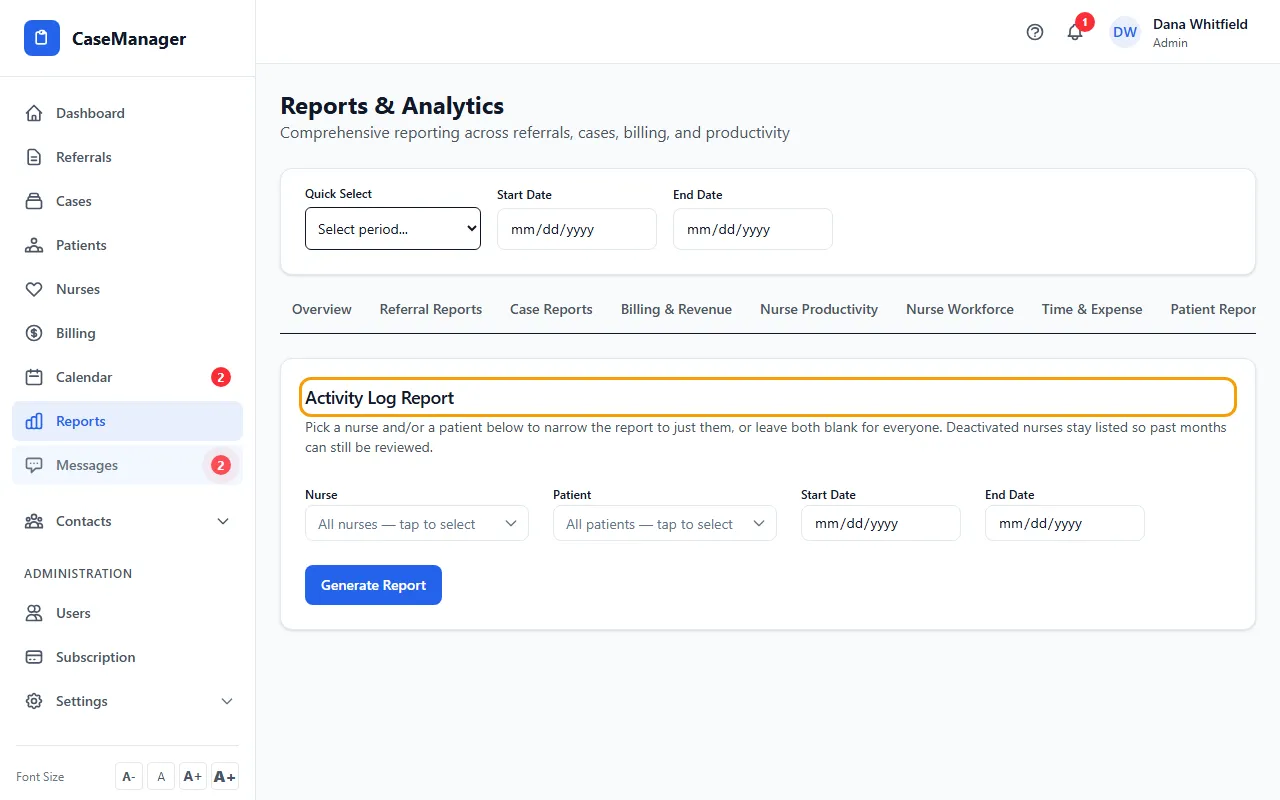
- Pick a Nurse and/or a Patient, or leave both blank for everyone.
- Set the Start Date and End Date, for example the first and last day of a month.
- Click Generate Report.
- Use the Patient list on the result to narrow it, and read the Totals, Mileage Reimbursement and Grand Total.
- Click Export CSV or Export PDF.
Good to know
The nurse list includes Nurse Case Managers and Internal Case Managers. Nurses who have been deactivated stay in the list, marked inactive, so past months can still be reviewed.
The dates here are the same as the dates at the top of Reports; changing one changes the other.
Each row shows the date, patient, case number, activity and notes, hours, miles, rate and amount.
If something goes wrong
- “Pick a start date and an end date first — for example the first and last day of the month you want to review.”
- Fill in both dates, then click Generate Report.
- “No activity entries found for the selected criteria.”
- Widen the dates, or clear the nurse or patient.