Enter your Tax ID, NPI and taxonomy for CMS-1500 claims
Save your EIN, NPI, taxonomy code and default place of service once, and they fill in on your CMS-1500 claims and invoices.
Last updated October 22, 2026
Who can do this: Admin
Steps
- Go to Administration > Settings and find Billing & CMS-1500 Form Settings.
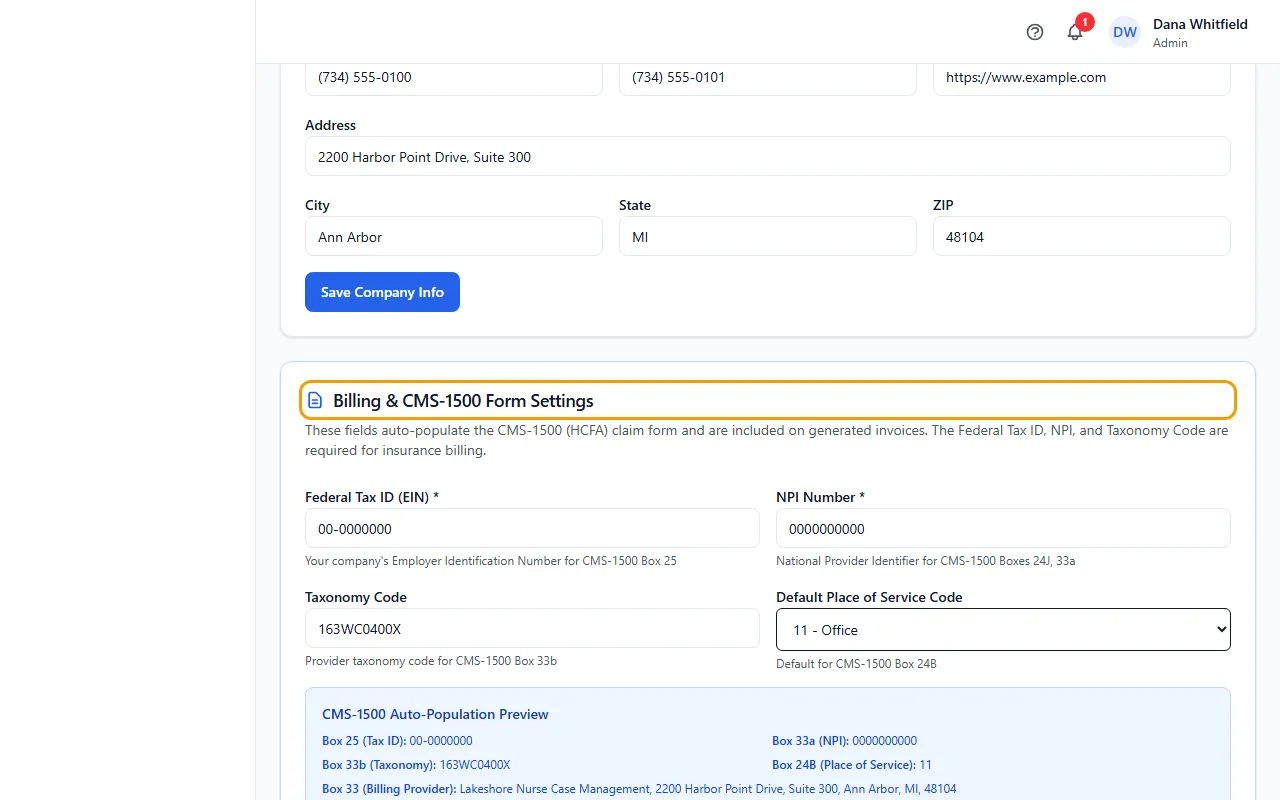
- Enter your Federal Tax ID (EIN) in the XX-XXXXXXX format. It fills CMS-1500 Box 25.
- Enter your 10-digit NPI Number. It fills Boxes 24J and 33a.
- Enter your Taxonomy Code (for example 251E00000X). It fills Box 33b.
- Choose your Default Place of Service Code, for example 12 - Home or 11 - Office. It's the default for Box 24B.
- Click Save Billing & CMS-1500 Settings. The CMS-1500 Auto-Population Preview then shows what will fill in.
Good to know
The card notes that the Federal Tax ID, NPI and Taxonomy Code are required for insurance billing. The screen saves without them, so check all three are filled in.
Box 33 (Billing Provider) and the phone number come from Company Information.
These numbers are also included on generated invoices.
Tips
- The preview shows what's saved, so it updates after you click save.