Find your way around Company Settings
Company Settings is where an Admin sets up your company details, logo, PDF look, billing numbers, email, fax and QuickBooks.
Last updated October 22, 2026
Who can do this: Admin
Before you start
- You need the Manage Settings permission. Admins have it by default. People without it don't see Settings in the menu.
Steps
- In the menu on the left, under Administration, click Settings.
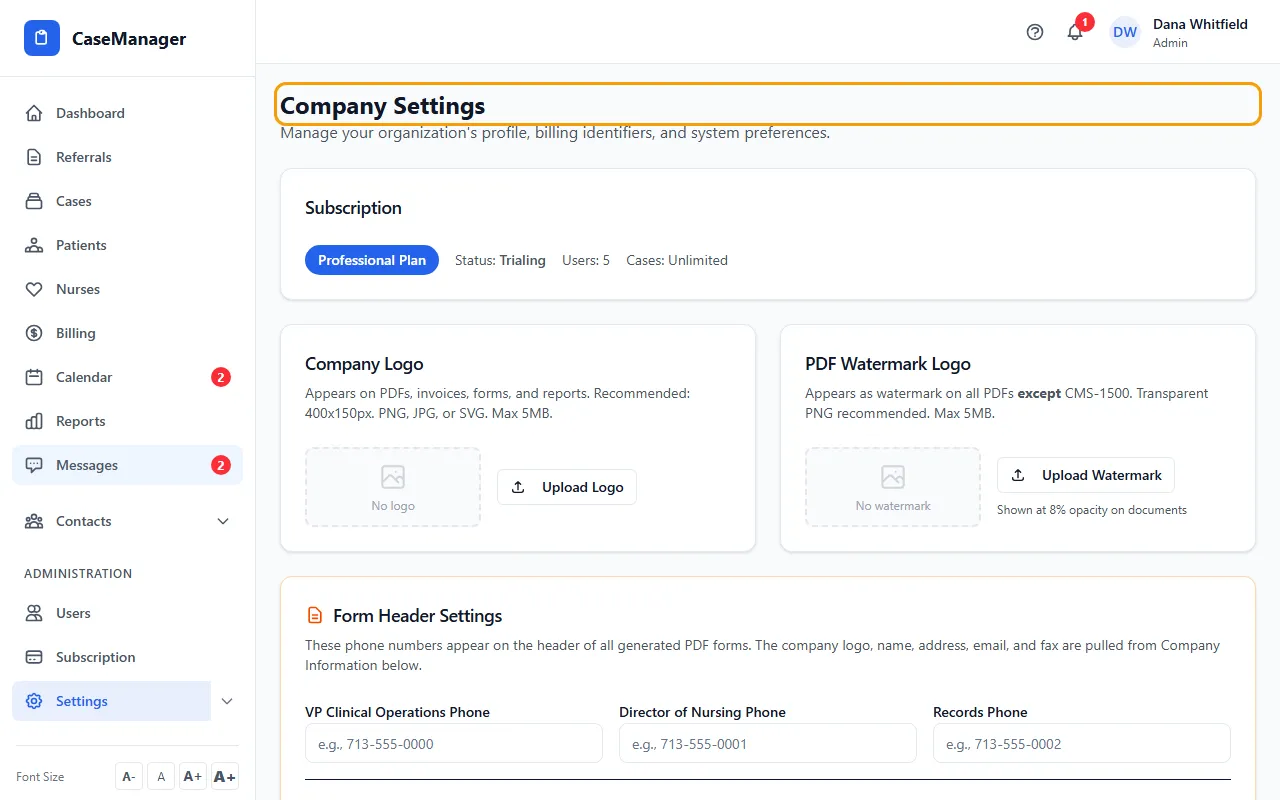
- Work down the page one card at a time. Most cards have their own save button, so save each card before you leave the page.
- Use the links under System Configuration to open Diagnosis Codes (ICD-10), CPT/HCPCS Codes, Billing Guides and Rates & Pricing. The same pages are listed under Settings in the menu.
What's on the page
Subscription shows your plan, its status, and your user and case limits.
Company Logo and PDF Watermark Logo: the images on your PDFs. See Add your logo and PDF watermark.
Form Header Settings: the phone numbers and colors on your PDF forms. See Set the phone numbers and colors on your PDF forms.
Company Information: your name, address, phone, fax, email and website. See Update your company information.
Billing & CMS-1500 Form Settings: your Tax ID, NPI, taxonomy code and place of service. See Enter your Tax ID, NPI and taxonomy.
Fax Configuration (SRFax): your SRFax account for faxing. See Set up faxing with SRFax.
Email Configuration: the company mailbox for automatic emails, and how each person sets up their own email. See Connect your company email.
QuickBooks Online Integration: see Connect QuickBooks Online.
The Help & Support card
The Help & Support card shows our support email, admin@casemgmt.io. We answer on business days, typically within one business day.
For an urgent problem that affects patient care or billing, put URGENT in the email subject. Include your company name, the email you sign in with, a clear description, and a screenshot if it's a screen problem. Please cover any patient information in the screenshot first.